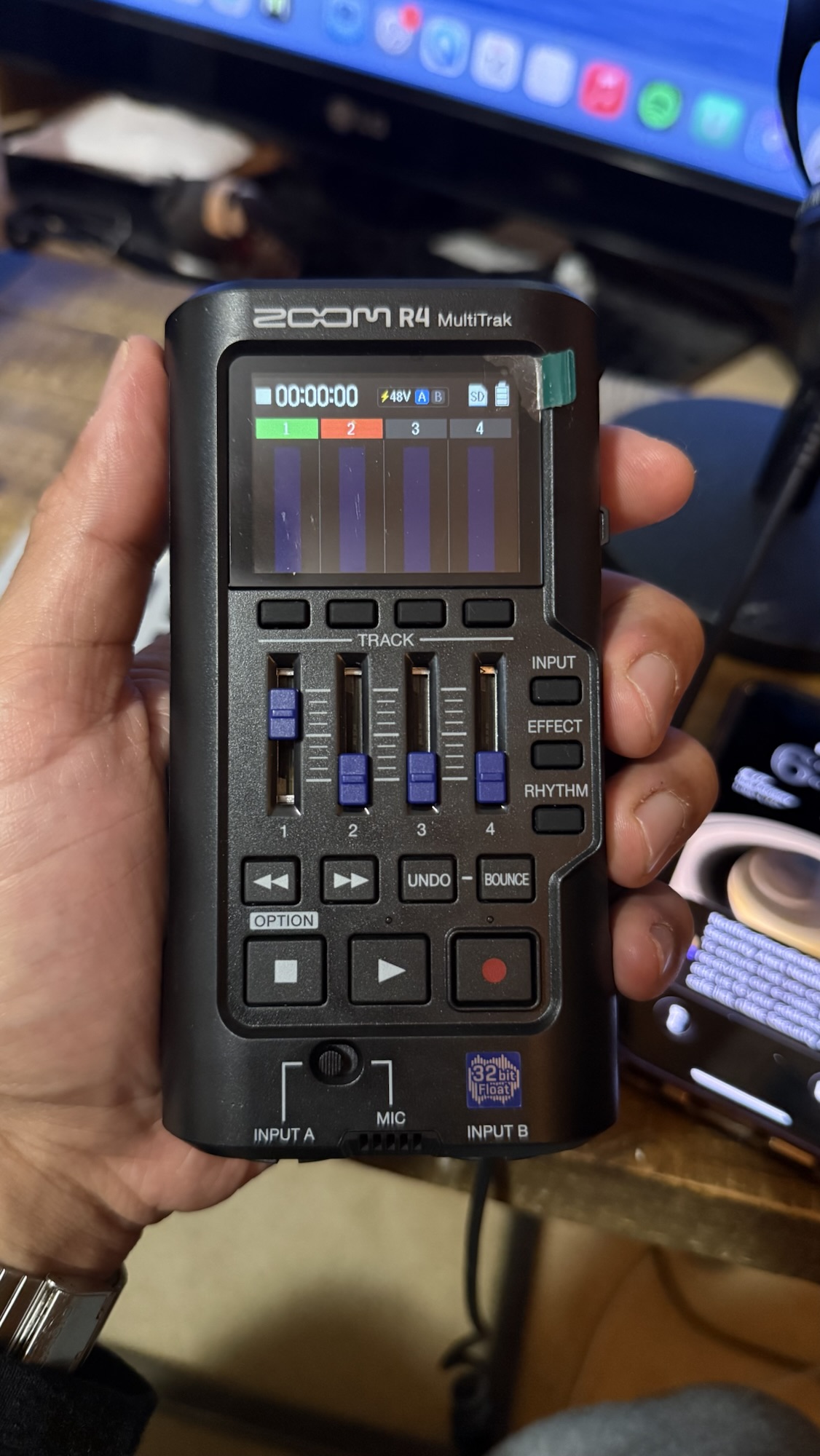
I made my first rap track on the Zoom R4 Multitrak recorder dissing Guitar Center Austin for bait and switching me with the wrong microphone. You can read about that and hear the finished song in this article.
First thing’s first…the Zoom R4 multitrack recorder is a great device.
But it isn’t perfect.
Temper your expectations when using this device.
Think pre-Bluetooth digital cameras in terms of user interface.
This thing has the same feel as those Walmart digital cameras that you would get as a kid that you still have laying around in a box somewhere.
If you’re too young to have ever owned one, well…. congrats, you’re now reading a blog.
But seriously, you probably wouldn’t have used one that much…but stay with me.
The Zoom R4 Is like a Game Boy Color for Artists
Something to be excited about is carrying this thing around and talking into it.
This thing is about the size of a Game Boy Color.
My iPhone 16 Pro is larger than the Zoom R4.
I haven’t done the exact specs, but man, I’m loving this thing.
I miss it when I’m not around it so far.
It actually reminds me of the SP-404 MKII but it’s a mixing console rather than a sampler.
Recording Vocals on the Zoom R4
The Zoom R4 gives you a few different possibilities when recording vocals.
You can record your main vocal track, ad-libs and backing vocals, and then bounce everything and add even more.
Or you can use it as an audio interface and record it right into your DAW.
It even gives you the option to switch between 24-bit and 32-bit float.
Zoom R4 + EP-133: A Portable Rap Studio?
As someone who makes beats with the EP-133, the Zoom R4 expands the possibilities of how much you can layer a beat.
I haven’t tried it as of the time of writing this article, but maybe I will soon and if I do, I’ll be sure to add an anecdote here.
But this thing is a great potential companion for the Teenage Engineering EP-133––not just portablym but ceratively.
You have four different banks—A, B, C and D on the EP-133, each allowing up to twelve different sounds per bank
And then with this, you have the opportunity to layer sounds on top of the limitations that the EP-133 would have had.
With the option to bounce the four tracks on the R4 you can potentially add endless layers to a beat started on the EP-133! Not to mention adding vocal tracks.
So essentially, you have a full studio with this and the EP-133 between beats and vocals.
The only thing you’d be missing is something to master your track on the go, but that’s something you can do on the phone or computer.
Using the Zoom R4 as an audio interface with FL Studio (or any DAW)
No, there isn’t DSP for your mic input on the Zoom R4––let’s get that out of the way.
However, the converters on here sound amazing. I recently recorded some throwaway vocal examples when testing a microphone Guitar Center sent me after bait and switching me with the wrong picture—the LA-220 V1 instead of the V2—even though the V2 was pictured (bastards).
More on that here.
When I listened back to the vocals later, I couldn’t believe the quality I was hearing through the Zoom R4.
As someone who primarily uses an Apollo Twin to record, I will have no qualms about leaving it at home in favor of the R4 for traveling (especially knowing I have Nuro Audio plugins in FL Studio).
The Built-In Microphone Is a Win
I love the built-in mic on the Zoom R4.
It’s very convenient for quick use and portability.
As much as I want to get quality-style recordings by plugging a microphone in with an XLR cable, this thing is enabling me to really get to the point and experiment when it comes to freestyling or gibberish.
It allows me to travel lighter. The bare minimal I need to write a song would be my Pocket Operator PO-33, a 3.5 mm cable and 1/4 adapter, a pair of earbuds and the Zoom R4.
I can live without the touchscreen on the R4 (more on that later).
I can live without a better way to rename projects, but I cannot continue to own this device if it did not have this built-in microphone.
The inputs work spectacularly as well, but being able to get a decent recording with the R4 by itself is a huge win. It’s great knowing I can simply grab and go with this if I was in a rush.
Some things I wish the Zoom R4 had
As much as I love the Zoom R4 for what it is, I have to mention a couple things I think could be improved.
I wish the buttons were rubber. Don’t get me wrong, there is something novel about clicking between recording, stopping, fast forwarding and rewinding but rubber buttons would add a more quality feel.
Zoom needs to release a mark II with a touchscreen or a bare minimum limited Bluetooth capability so I can connect one of those mini RGB keyboard remotes because trying to type file names in with these two arrows is ass.
I really want to emphasize this point if you plan on organizing your files.
Naming files on the device is going to frustrate you.
The Zoom R4 Is a Feedback Loop for Songwriting
I love rewinding and fast-forwarding and punching in on here with my SM58 connected.
Recording straight gibberish over a beat to get my energy up is a lot of fun––and I optimize my workflow for fun.
That’s really what this thing does for me.
It’s not a perfect device…
Nor is it a full DAW, but it is simplified for your songwriting pleasure.
It’s taken me a little bit to get used to navigating everything only because I’m just used to thinking in a DAW.
But I do like the concept, and it is helping me create songs in batches––i.e. copying a beat several times to do different takes on each new project–– which is nice.
It provides me a feedback loop for songwriting so I can quickly get ideas down.
It’s literally a Game Boy for rappers and artists but rather a compact, stripped down DAW in a box.
If you’re thinking about trying one out, I don’t think you’d be disappointed so long as you know what you’re getting and not getting with this bad boy.